Features

Less screen,
more road.

Roadar is built around the iPhone surfaces you actually use while driving. Set it up once, then keep your eyes where they belong.


Live alerts

The distance
ticks down.

A report inside your alert radius starts a Live Activity that updates in real time. It runs on the Lock Screen, in the Dynamic Island, and on CarPlay. One quiet ping, then the countdown.

Enforcement close ahead takes over the whole screen. 0.4 miles, 0.2, 400 feet. Then it clears.

Every alert shows how many drivers corroborated it. This is a real screenshot.
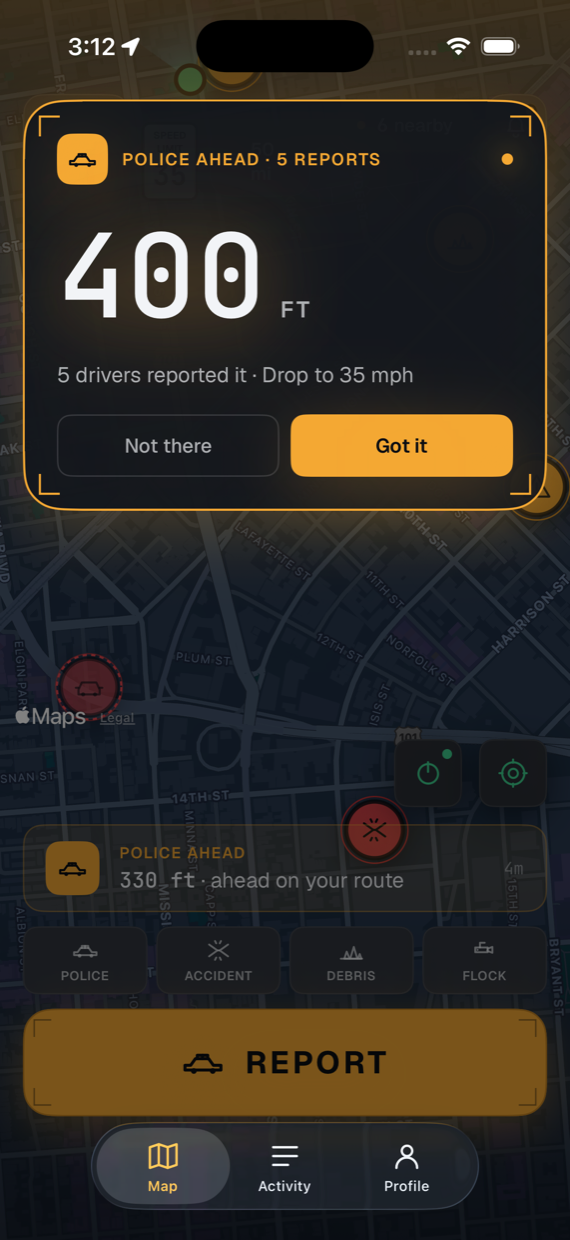
Roadar full-screen takeover alert: police reported 400 feet ahead, 5 drivers reported it, drop to 35 mph
One press

Report without
opening the app.

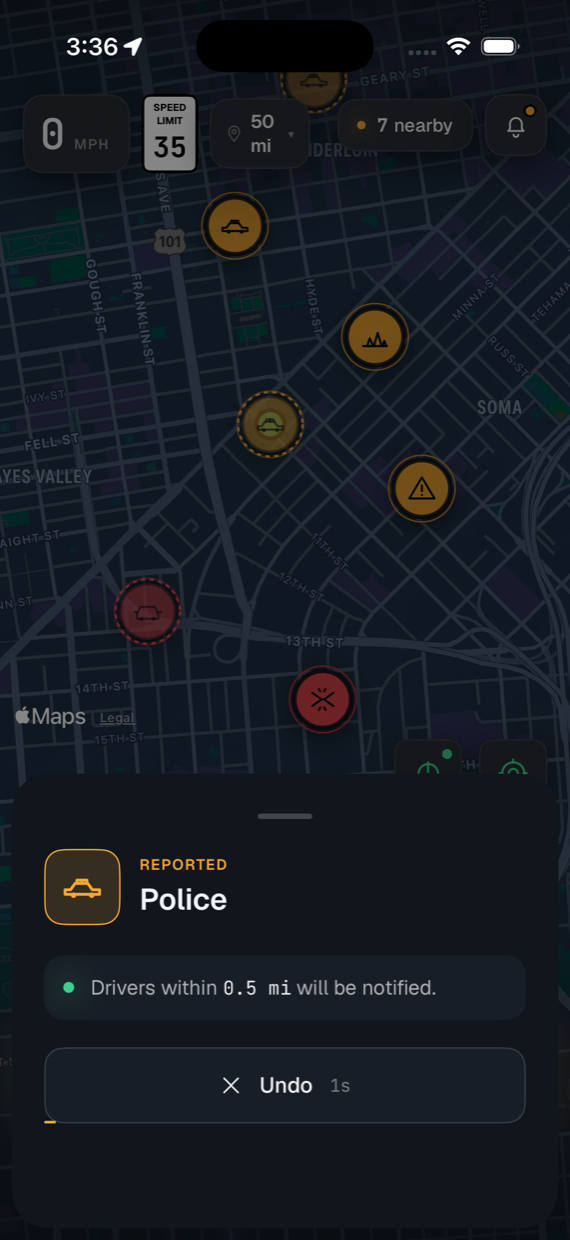
Map the Action Button to your most-used report. Or use the Home Screen widget, the Control Center control, or Siri. One press files at your spot. Five seconds to undo, every time.

Changed your mind later? Take a report down from the Activity tab within 24 hours, until three drivers have confirmed it.

Roadar right after a one-tap report: a Police report is filed, drivers within 0.5 miles will be notified, and an Undo button counts down
Built-in trust

Reputation.
Not popularity.

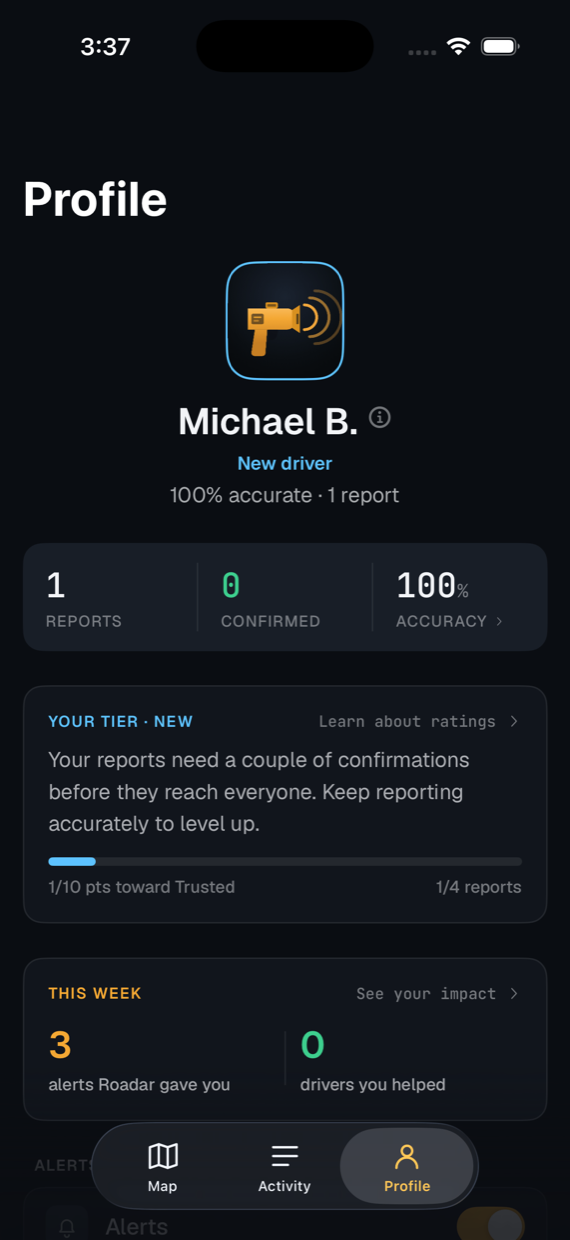
Honest reporting earns weight. Bad-faith disputes lose it. Your profile shows your tier, your accuracy, and the drivers you helped this week.

No follower count, no leaderboard, nothing to game.

Roadar profile: New driver tier at 100% accuracy, progress toward Trusted, and a weekly impact card
Activity

Every report.
On the record.

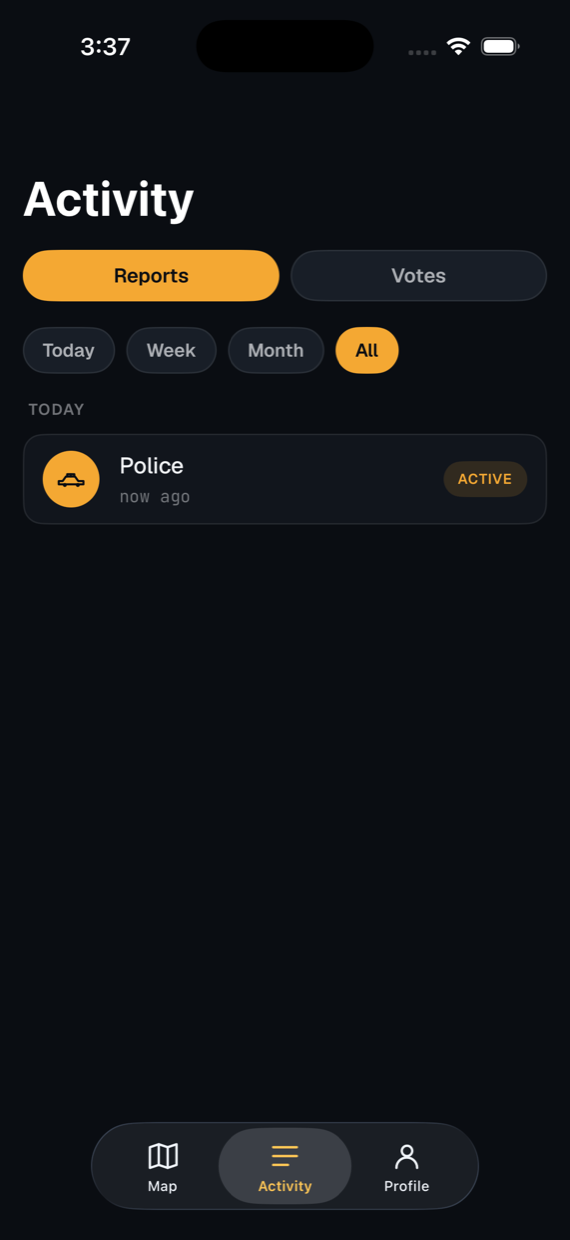
The Activity tab keeps your reports and your votes in one place. Filter by today, this week, or this month.

Filed something by mistake? Take it down right there, until three drivers have confirmed it.

Visible only to you. Other drivers never see your history.

Roadar Activity tab listing a filed Police report marked active, with filters for reports and votes
Tune the noise

Your radius.
Your alerts.

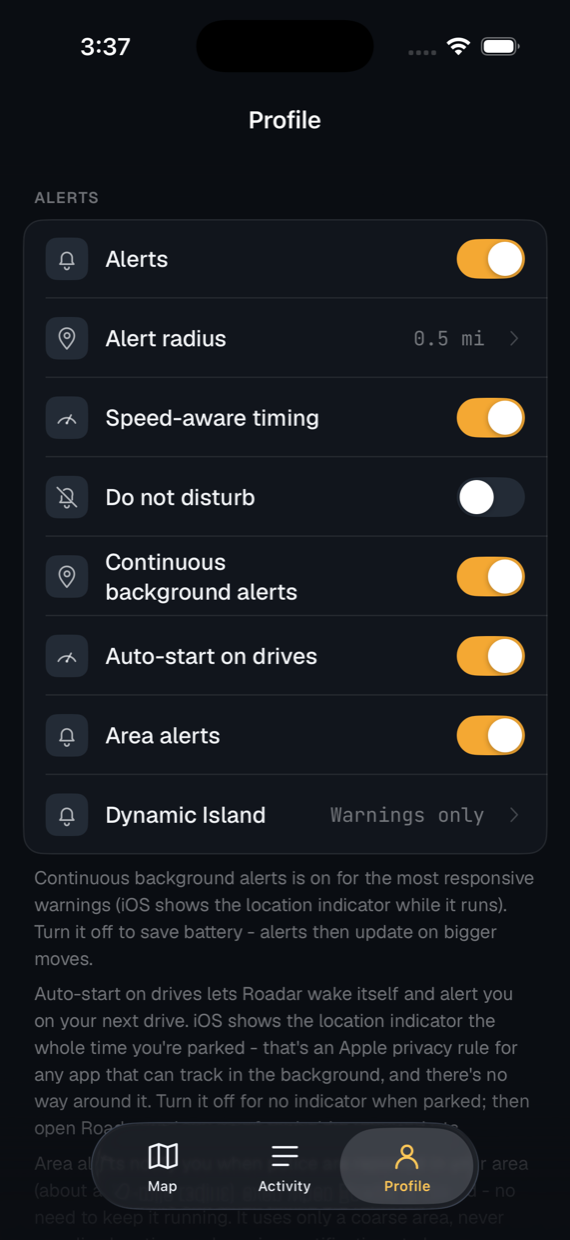
Alert radius (default 0.5 mi) and map radius (default 50 mi) are independent. Tune them to your actual commute.

Speed-aware timing warns you earlier the faster you're going. Do not disturb silences everything with one switch. Auto-start wakes Roadar on your next drive.

A live speed readout with the posted limit beside it. Units and haptics are yours to set too.

Roadar alert settings: alert radius, speed-aware timing, do not disturb, continuous background alerts, auto-start on drives, area alerts, and Dynamic Island warnings
Background

Phone locked.
Roadar on duty.

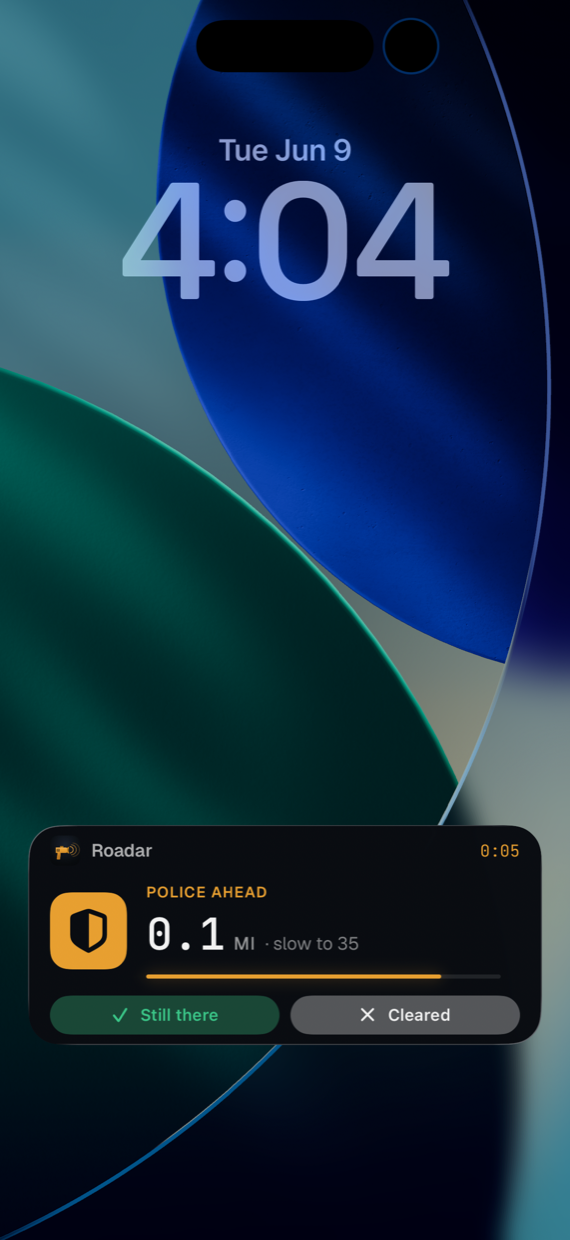
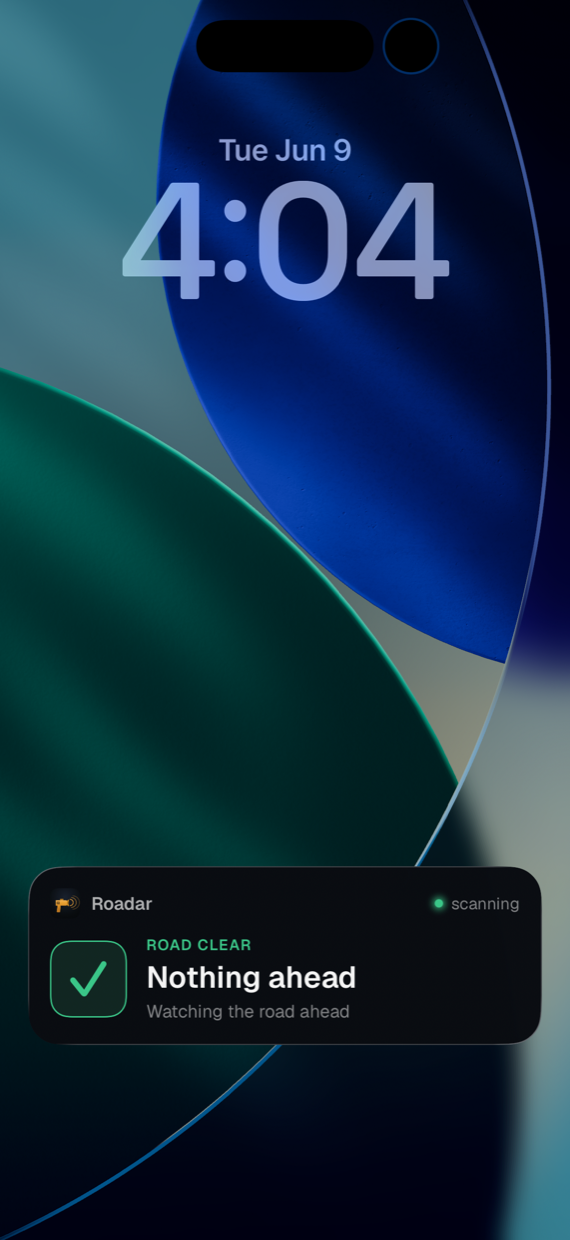
The Live Activity holds the Lock Screen for the whole drive. Amber when something's ahead. Green when the road is clear. Grant Always location and it works with the app closed too.

Lock Screen Live Activity: police ahead in 0.1 miles, slow to 35, with a live countdown and Still there / Cleared buttons
Something ahead. Distance, a live countdown, and one-tap confirm. Without unlocking.
Lock Screen Live Activity in the clear state: road clear, nothing ahead, watching the road ahead
Nothing ahead. It says so, keeps watching, and stays quiet.

Continuous alerts

On by default for the most responsive warnings. Switch to the lighter battery-saving mode in Settings.

Area alerts

Police, accidents, and road hazards reported in your wider area push a notification even when the app is fully closed.

No location history

Background location is used only to evaluate proximity to nearby reports. Nothing is stored.

Six categories

Tap what you see.
That's the whole interaction.

Speed enforcement The headline. Slow down before you reach it.
Accident Crash on or beside the road. Expect a slowdown.
Road hazard Pothole, ice, flooding, unsafe lane.
Stalled vehicle Broken down in a lane or shoulder. Move over.
Debris on road A ladder, a mattress, a tire shred over the crest.
Flock camera Fixed ALPR / surveillance cameras. As long as drivers keep confirming one, it stays on the map day after day. Roadar also ships with 300,000+ mapped Flock, speed, and red-light cameras from the OpenStreetMap community (the DeFlock project and others) - useful in your city from your very first drive, and votable like everything else.
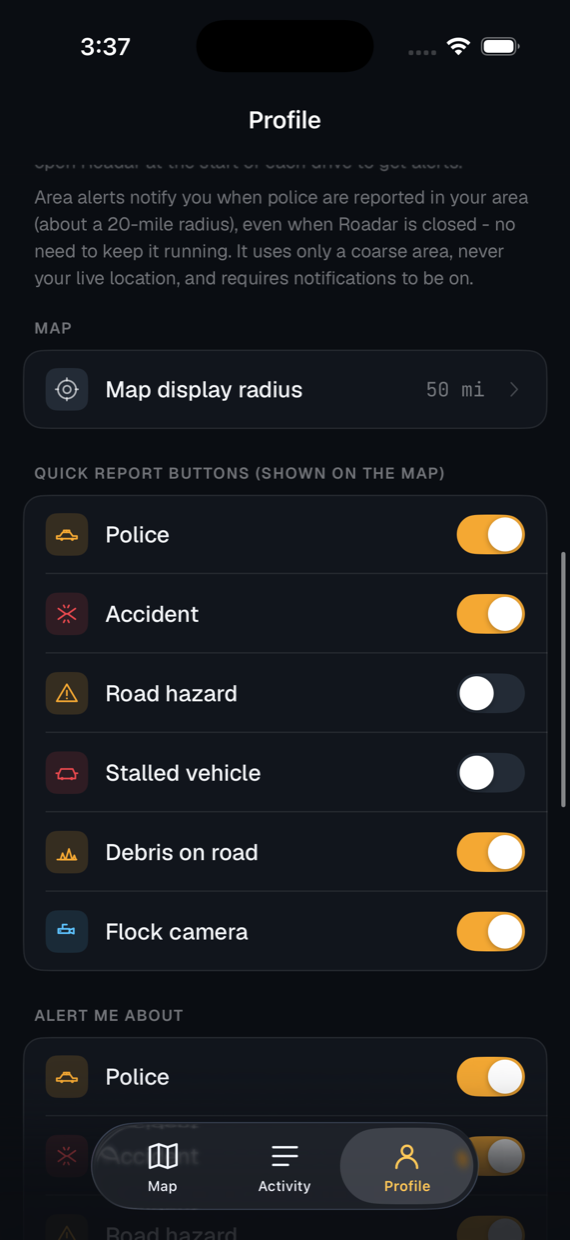
Roadar settings with per-category toggles for the quick report buttons shown on the map and for which categories alert you
Pick which categories live as quick-tap buttons on your map. And which ones are allowed to alert you.
How it works

Report. Confirm. Alert.
A loop that runs itself.

01

A driver ahead taps once.

One press files at their location, with five seconds to undo. You can still take it down later if no one has confirmed it yet.

02

Drivers at the spot weigh in.

Anyone within about a mile can confirm the report or mark it cleared. Confirmations extend its life. Disputes shorten it.

03

You get a quiet ping.

When the report sits on your route inside your alert radius, Roadar fires a single notification and a Live Activity.

Do not interact while driving

Set Roadar up before you drive, or have a passenger operate it. Obey all traffic laws and speed limits. You are responsible for the safe, attentive operation of your vehicle at all times.

In your language

Roadar speaks English, Spanish, and Russian. Pick your language on the very first screen - or anytime in Settings - and every alert, screen, widget, Live Activity, and Siri phrase follows.

Lawful information sharing

Roadar is intended for use in the United States to support the lawful, good-faith sharing of information about public road conditions among drivers. That is protected expression under the First Amendment. Use the app only for lawful purposes.

The core app.
Free for everyone.

Free to download, with no ads and no tracking. One optional add-on, Avoid routing, is $0.99 a year with a 6-month free trial.